


Introduction to Cryptocurrency Trading on IQ Option
Cryptocurrencies are traded globally 24/7, resulting in high-volatility price movements and frequent trading opportunities. IQ Option caters to this dynamic environment with an integrated suite of features and trading flexibility.
What Makes Crypto Trading Unique on IQ Option
Round-the-Clock Access: IQ Option supports 24/7 trading for cryptocurrencies, unlike traditional markets that close at night or on weekends. This allows traders to respond to global events at any time.
Intense Volatility: Major crypto assets such as Bitcoin and Ethereum experience rapid, unpredictable price movements. Quick gains are possible — but so are swift losses.
Varied Trade Types: IQ Option offers binary options, digital options, and Contracts for Difference (CFDs) for crypto markets. Each type suits different time frames and risk appetites.
Unified Trading Hub: Trade cryptocurrencies alongside forex, stocks, commodities, and indices from the same intuitive dashboard on web or mobile.
Accessible Entry: The minimum deposit ($10) and minimum trade size ($1) open crypto trading to nearly any budget.
Explore more in-depth articles and practical tips within our dedicated cryptocurrency trading resources.
Available Cryptocurrency Assets on IQ Option
IQ Option offers access to prominent cryptocurrencies, including:
- Bitcoin (BTC/USD): The most established digital currency, widely followed by traders.
- Ethereum (ETH/USD): Known for its smart contract platform and large developer network.
- Litecoin (LTC/USD): A longstanding alternative, often called “silver” to Bitcoin’s “gold.”
- Other Cryptos: Depending on region and platform updates, additional major pairs and altcoins may be listed.
Before trading, check the asset list in your dashboard to confirm availability in your region. Asset lists and leverage options can change without notice due to regulatory or policy updates.
Risk tip: Cryptocurrency and derivative trading is high-risk. Volatility means you can lose your entire investment. Never risk more than you can afford to lose.
Getting Started on IQ Option for Cryptocurrency Trading
IQ Option’s streamlined design enables traders of any background to register, practice, fund their accounts, and access crypto markets.
How to Create an Account and Use the Demo Account for Practice
Register: Go to the platform’s website and sign up with your email, phone, or a social account. Be sure to use correct, up-to-date information.
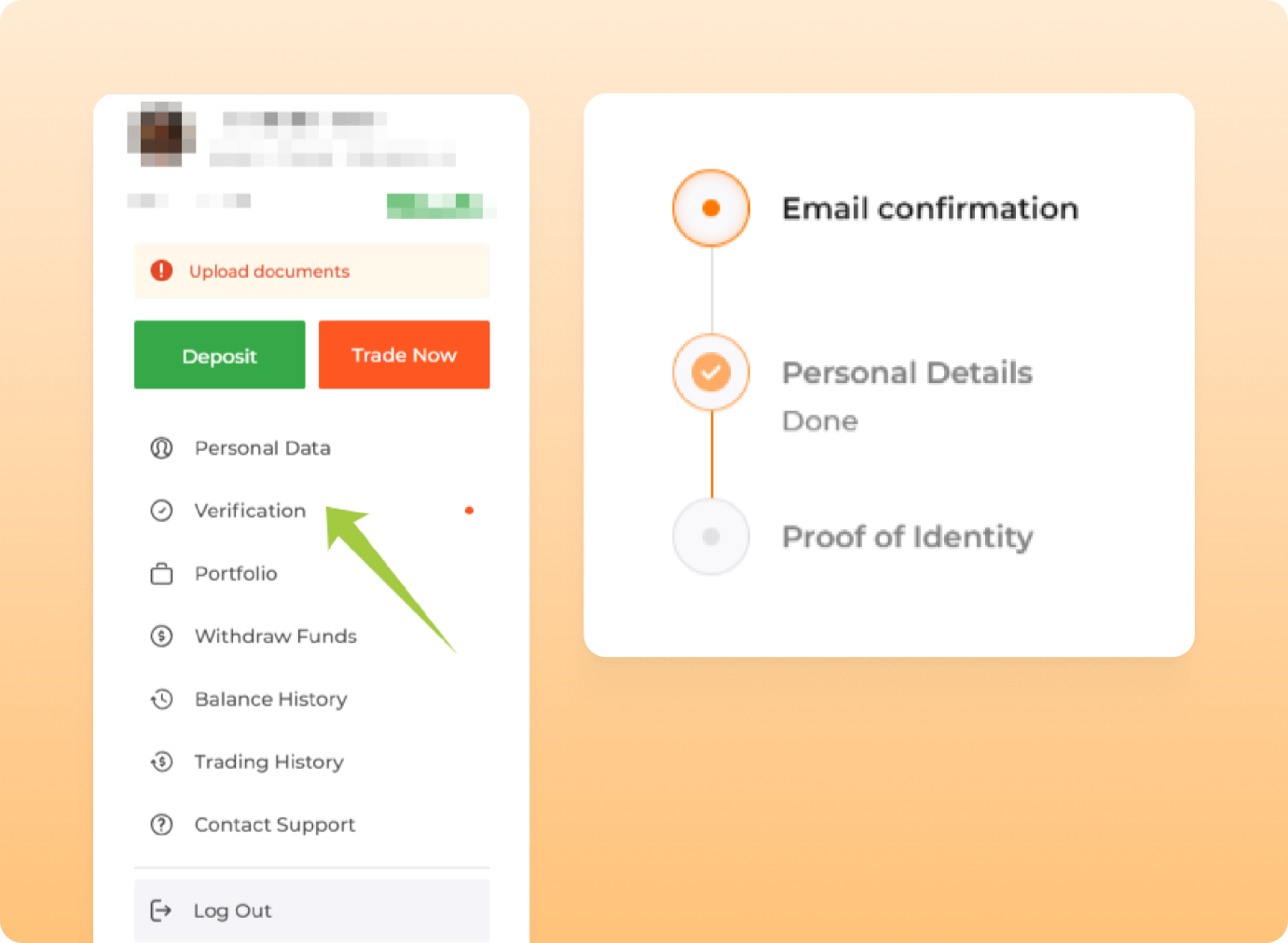
Verify Your Account: Certain functions, such as deposits and withdrawals, may require personal verification for compliance and security.
Instant Demo Access: All users receive a demo trading account with virtual funds. This demo is unlimited and can be reset any time, allowing for risk-free practice before real-money trading.
Try Mobile Trading: For on-the-go access to crypto markets and instant notifications, download IQ Option trading app for iOS or Android. The app mirrors all key web features.
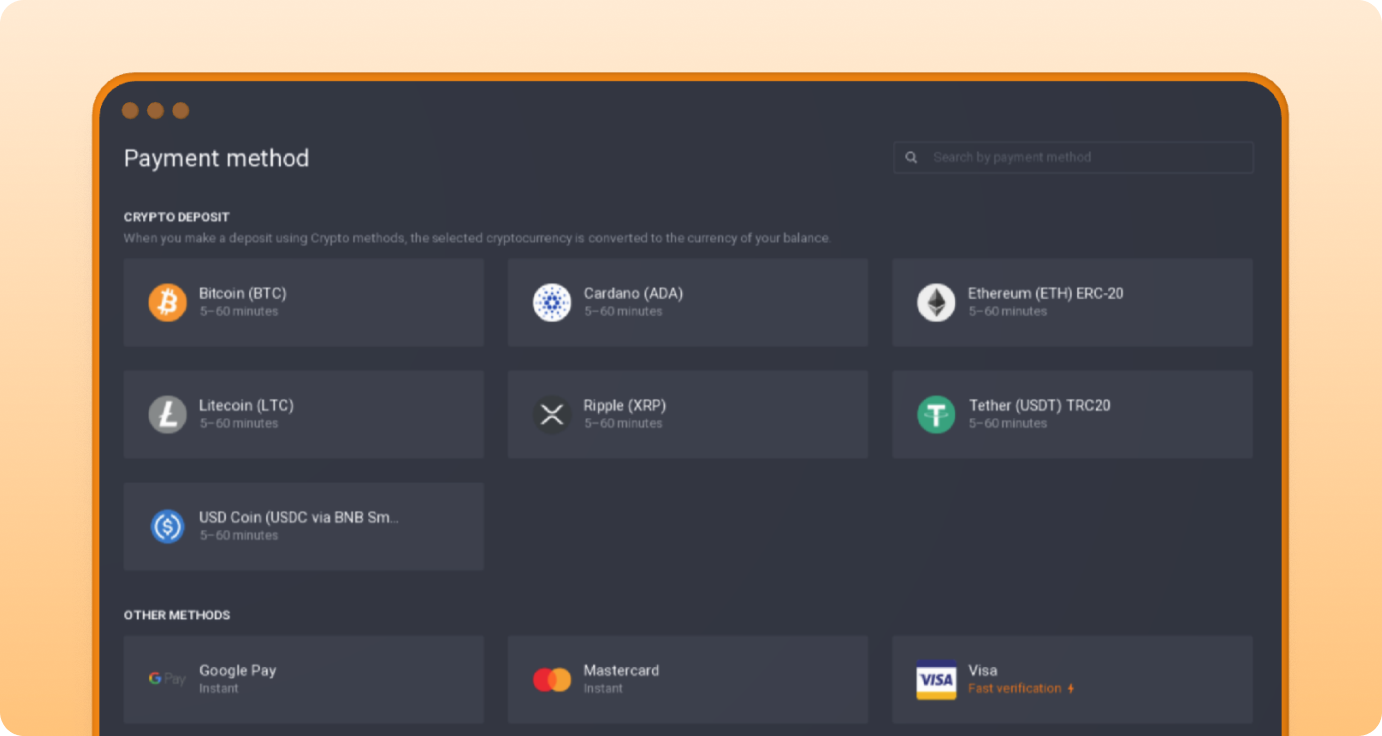
Review Wallet Options: Choose your preferred funding and withdrawal methods. Options may vary depending on your country.
Practice tip: Use the demo as long as needed to develop your strategy and understand how crypto markets operate without risking real funds.
Minimum Deposit and Trade Size Requirements for Crypto Trading
Minimum Deposit: $10 (or equivalent in your local currency) is required to begin live trading.
Minimum Trade Size: Each cryptocurrency trade can be opened from $1, ideal for cautious position sizing and testing new setups.
Payment Methods: IQ Option accepts major cards, e-wallets, and in some regions bank transfers. Processing times depend on the selected method.
Money management tip: Only transfer funds you have set aside for speculative trading, and always leave an emergency buffer.
Accessing Cryptocurrencies from IQ Option Dashboard
Web/PC Trading: After logging in, click the “+” button or “Assets,” then select Options to trade crypto options or Margin to trade crypto CFDs Pick your desired pair.
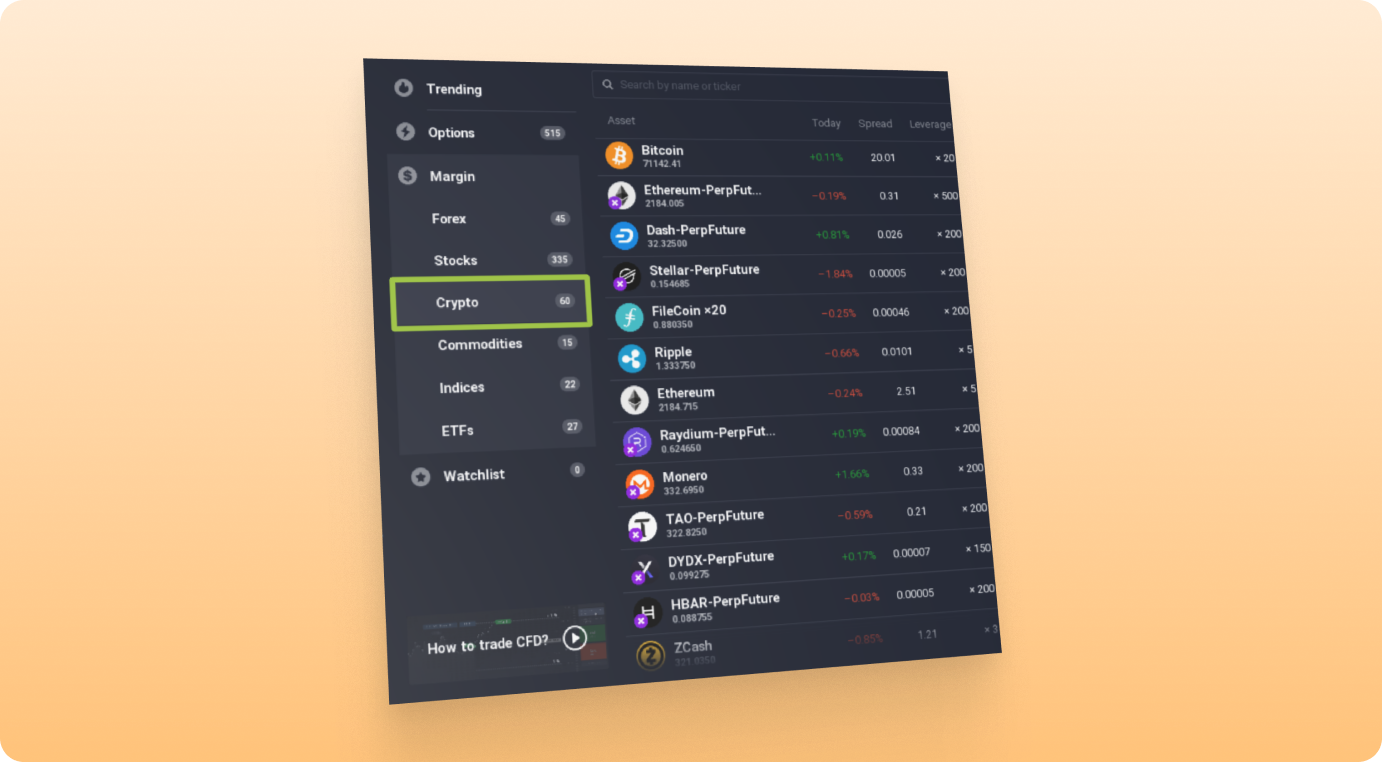
Mobile App: Tap on the asset or use the search function to view available cryptocurrencies. Select the pair you wish to trade.
Switching Account Modes: Toggle seamlessly between demo and live accounts. Use demo for practice and live when ready.
Effortless navigation allows you to monitor, analyze, and switch between different asset classes — all in one interface.
Key IQ Option Platform Features for Cryptocurrency Trading
IQ Option offers comprehensive trading modes and analytical tools.
Crypto Trade Types Explained: Binary Options, Digital Options, CFDs
The choice of trade type can shape both your strategy and risk:
| Trade Type | How It Works | Suitable For | Risk Level |
| Binary Options | Predict if price will be above/below entry at expiry for a fixed payout | Short-term direction, set risk | High |
| Digital Options | Pick your own strike price – adjusting payout and risk | Flexible targets, variable risk | High |
| CFDs | Buy (Long) or Sell (Short) positions with multipliers | Trend following, day trading | Medium–High |
Binary Options: Defined outcome, fixed payout, chosen expiry (e.g., 1–5 minutes).
Digital Options: Greater flexibility with strike selection; potential for larger rewards and losses.
CFDs: No fixed expiry, stop-loss/take-profit tools, and multipliers up to x100.
Caution: High leverage increases both your potential profit and potential loss. Always start with low multiplier settings.
Chart Tools and Technical Indicators Available
IQ Option’s platform supports detailed, customizable charting:
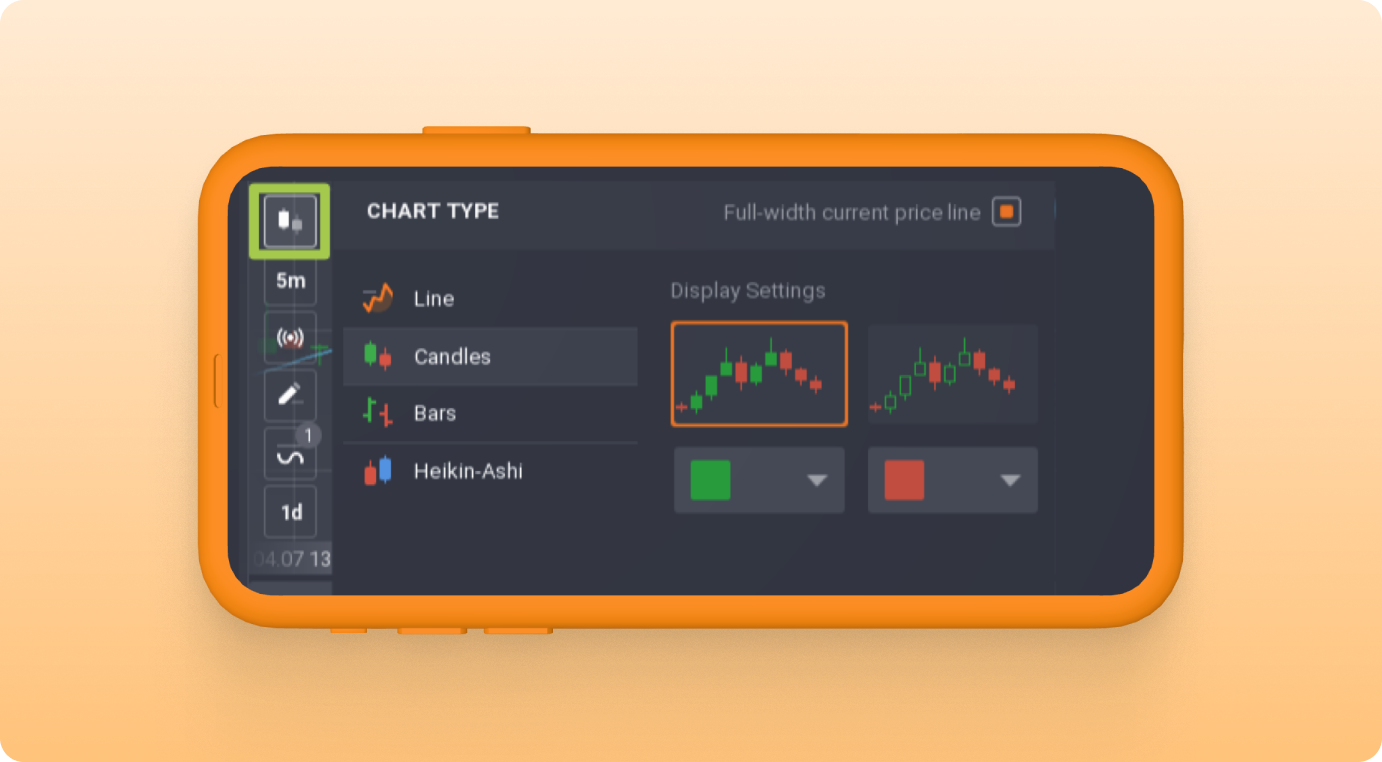
Chart Types: Candlestick, bar, line, or area
Multi-Asset Monitors: View up to nine charts simultaneously
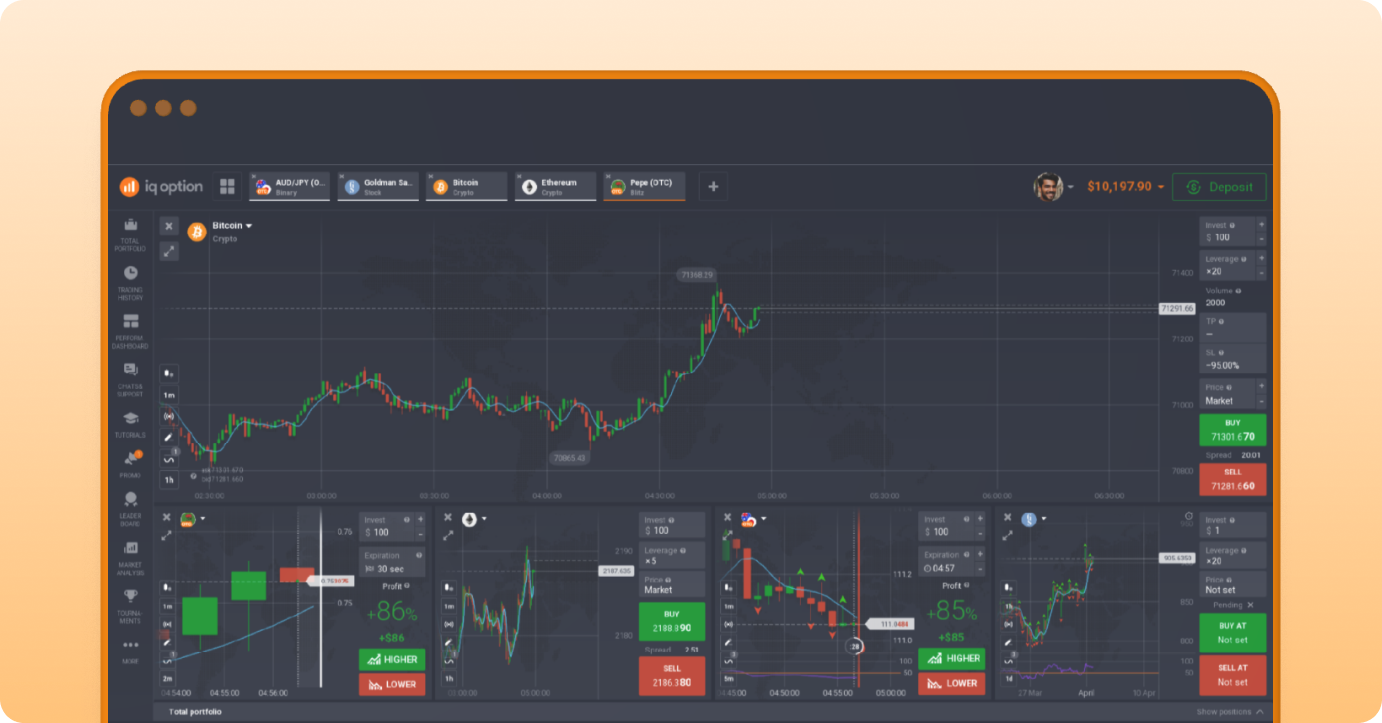
Popular Technical Indicators:
- Simple Moving Average (SMA 14)
- Relative Strength Index (RSI 14)
- Bollinger Bands
- MACD
- Fibonacci retracement
Chart Customization: Adjust colors, overlays, and timeframes
Trade Direct from Chart: Execute and manage trades directly
Using Multipliers and Auto-Close Features
Multipliers: Amplify exposure (e.g., x100 magnifies movements 100x)
Stop-Loss: Automatically limits losses
Take-Profit: Locks in profits
Auto-Close: Executes exit levels even if offline
Step-by-Step Guide to Placing Your First Cryptocurrency Trade on IQ Option
Risk warning: Trading cryptocurrencies and derivatives carries the risk of losing all invested capital.
1. Select Crypto Asset and Set Parameters
- Log into your account
- Choose “Cryptocurrencies”
- Select asset (e.g., BTC/USD)
- Pick trade type
2. Analyze with Chart Tools
- Use candlestick charts
- Apply SMA 14 and RSI 14
- Check support/resistance
3. Enter Amounts & Set Trade Terms
- Enter trade amount
- Set expiry (options)
- Choose multiplier (CFDs)
4. Apply Risk Controls
- Set stop-loss
- Set take-profit
5. Execute Buy or Sell
- Buy if bullish signals
- Sell if bearish signals
6. Monitor and Manage
- Track performance
- Close or let expire
- Practice in demo
Mobile Trading Tips
- Use stable internet
- Avoid trading during connection issues
- Enable push notifications
Essential Strategies and Best Practices for Crypto Trading
Disclaimer: All strategies are informational. Outcomes are not guaranteed.
Using SMA 14 and RSI 14
SMA 14:
- Buy: Price above SMA
- Sell: Price below SMA
RSI 14:
- Buy: RSI rising from below 30
- Sell: RSI falling from above 70
Managing Volatility and Timing
- Trade during 13:00–17:00 UTC
- Avoid low-liquidity periods
- Focus on major pairs
Practical Risk Management
- 3-5-7 Rule:
- 3% risk per trade
- Max 5 positions
- Max 7% exposure
- Always use stop-loss
- Diversify trades
- Control emotions
Common Pitfalls in Crypto Trading
- Overtrading and FOMO
- Ignoring stop-loss
- Misunderstanding trade types
- Not keeping records
Advanced Tips & Trends for Crypto Trading in 2026
- Leverage up to x100 (use cautiously)
- Use breakout strategies
- Stay updated on platform changes
Risk note: Leverage magnifies gains and losses.
Final Reminders
- Stay updated on platform changes
- Never invest more than you can afford to lose
- Trading carries high risk
- Practice on demo before live trading