


For users who want to receive funds to OPay or PalmPay, the key point is that the withdrawal is usually completed through a local bank transfer route, so the bank account details you provide must match the receiving account exactly.
How to open the withdrawal section on IQ Option
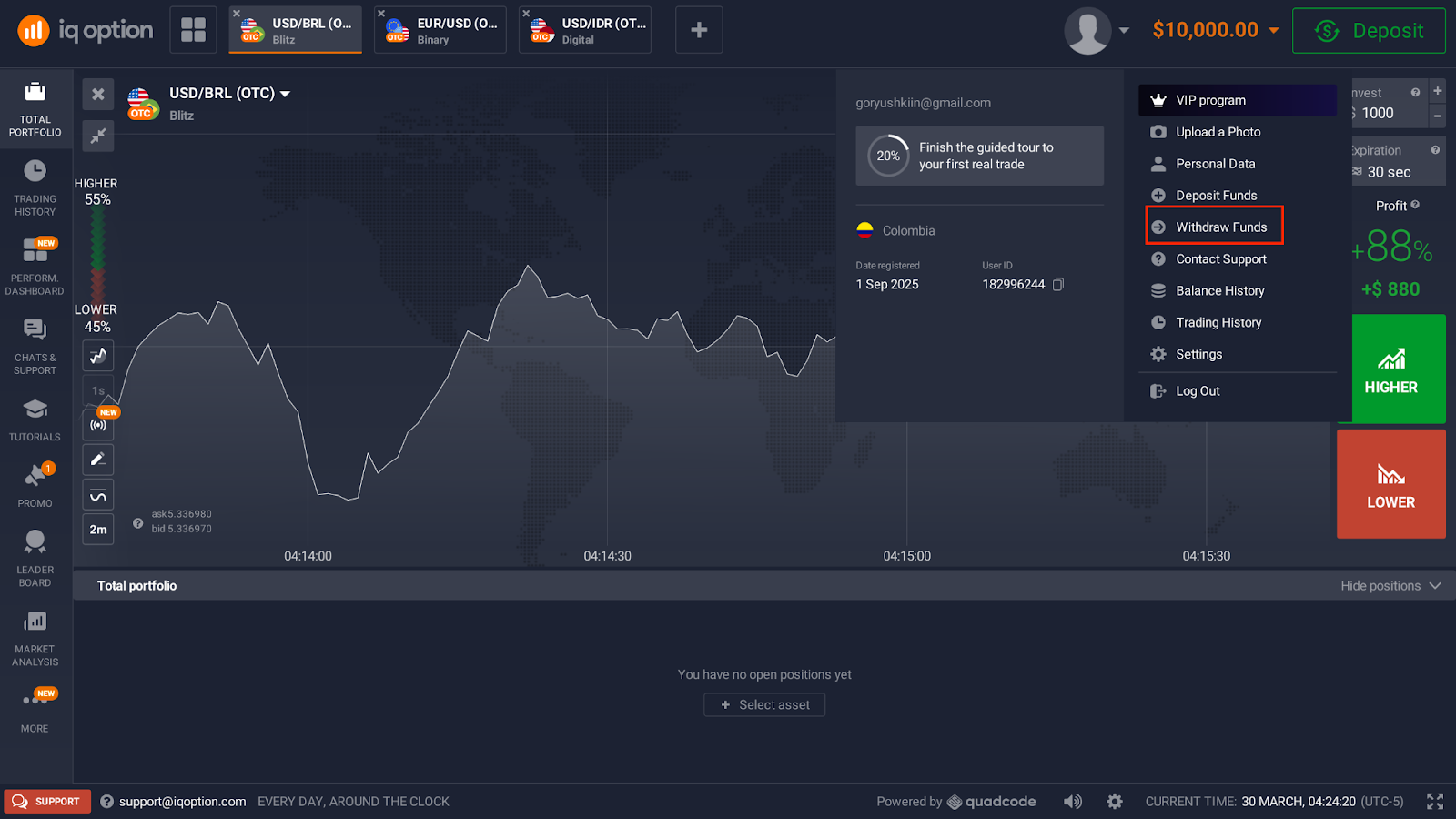
To make a withdrawal, click on the user icon and select “Withdraw Funds” from the dropdown menu. If you need a full overview of all available methods, see the complete guide onhow to withdraw from IQ Option.
On the withdrawal page, you will see:
- a list of available withdrawal methods on the left;
- the required fields for the selected payout method;
- a history of previous withdrawals at the bottom, if any requests were made before.
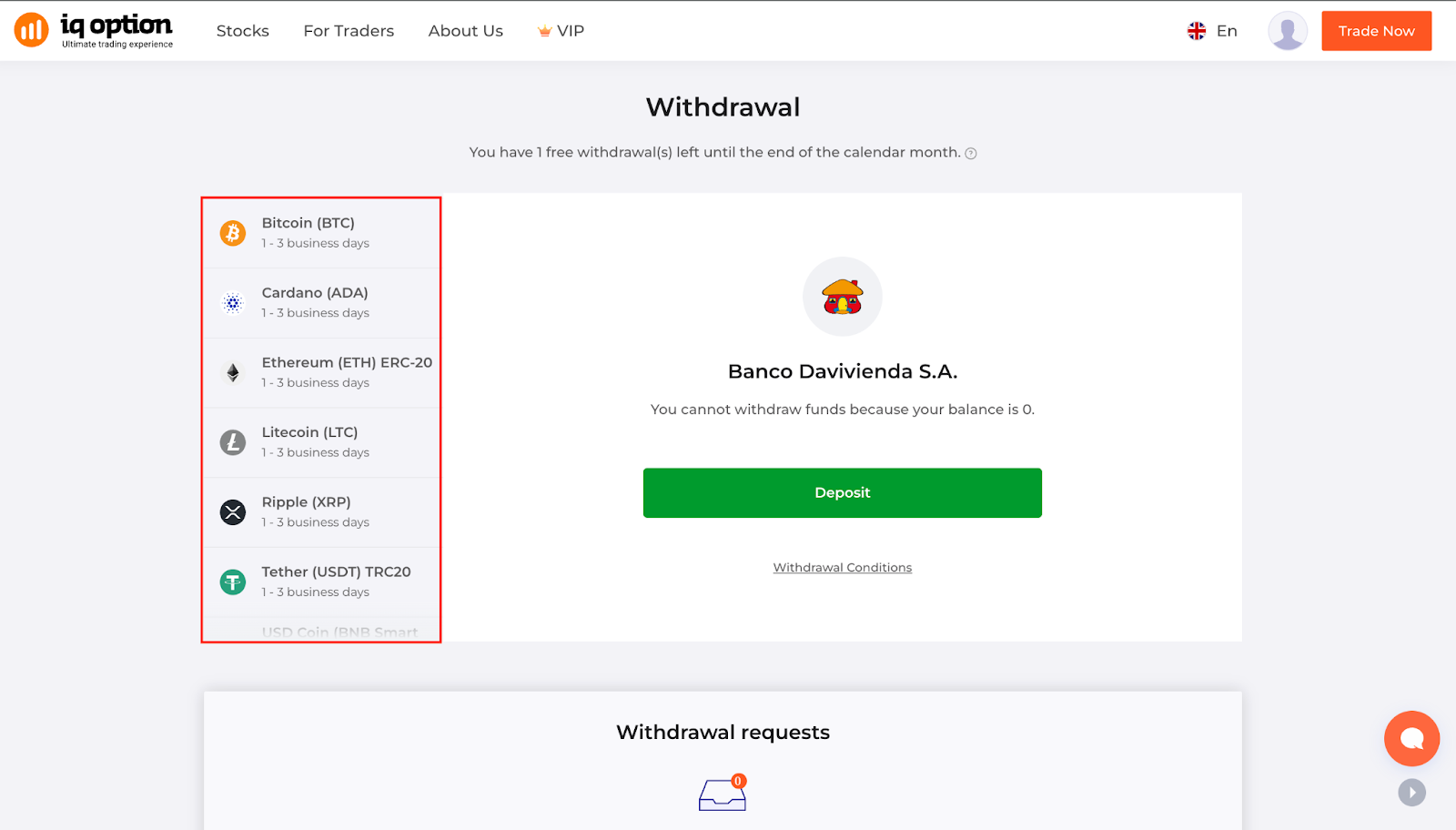
Not every payout option is always available. Some methods may appear or disappear depending on the account balance, because each payment method can have its own minimum withdrawal amount.
Important before you withdraw
Make sure your account is verified before you begin — here’s how to verify your IQ Option account. Before submitting a withdrawal request, keep these points in mind:
Available methods may vary
On the withdrawals page, some payout options may be unavailable. This depends on the account and the minimum amount allowed for each withdrawal method.
You can cancel the request within 10 minutes
After creating a withdrawal request, you have 10 minutes to cancel the order in case you change your mind or enter the wrong amount.
Bank transfer may take longer
Withdrawals via local bank transfer can take longer than some other payout options, so this should be considered if you need the funds urgently.
IQ Option Nigeria withdrawal methods
For Nigeria, IQ Option supports local banks via Webpayment, including banks such as:
- Fidelity Bank
- Wema Bank PLC
- Union Bank PLC
- United Bank for Africa
- Zenith Bank PLC
- and other supported local banks
In practice, this means the withdrawal is usually sent to a Nigerian bank account. If your OPay or PalmPay account is linked in a way that allows you to receive funds through the provided banking details, you can use that route, as long as the account information is correct. Nigerian users can receive their IQ Option local bank transfer in Naira directly to a linked OPay or PalmPay account number.
How to withdraw from IQ Option to OPay or PalmPay in Nigeria
Step 1: Log in to your IQ Option account
Open the platform, click on the user icon, and choose Withdraw Funds.
Step 2: Choose an available Nigerian withdrawal method
On the left side of the withdrawal page, select one of the available local bank payout options for Nigeria.
Step 3: Enter the withdrawal amount
Type in the amount you want to withdraw. Keep in mind that some payout methods may only be available if the amount meets that method’s minimum withdrawal requirement.
Step 4: Fill in the required bank details
Once the payout method is selected, the system will display the fields required to create the withdrawal request.
For Nigerian bank withdrawals, the key details are:
Bank account holder’s name
The account holder’s name must match the name registered with the bank exactly.
Do not use:
- nicknames;
- shortened names;
- abbreviations.
If the name does not match, the bank may reject the transfer.
Bank account number (NUBAN)
You must enter the bank account number (NUBAN) exactly as required. It is typically:
- 10 digits;
- entered without spaces or hyphens.
This is especially important when withdrawing to an account connected with OPay or PalmPay. Any mistake in the number can cause a failed or delayed payout.
Step 5: Submit the withdrawal request
After all mandatory fields are completed, submit the request.
Step 6: Review the request if needed
After the request is created, you have 10 minutes to cancel it if you notice a mistake or decide not to proceed.
Step 7: Wait for processing
Since bank transfer methods may take longer than other payout methods, some waiting time should be expected. For a detailed breakdown of bank transfer processing times by method, refer to the full guide.
What to check when withdrawing to OPay or PalmPay
If you want to receive your IQ Option withdrawal through OPay or PalmPay, make sure the payout details are entered exactly as they appear on the receiving side.
You should verify:
- the account holder’s full name;
- the NUBAN account number;
- that the account is active and able to receive transfers.
The most common reasons for failed withdrawals are incorrect details or a mismatch between the bank account information and the registered account holder’s name.
Why some withdrawal methods may not appear
On the withdrawal page, not every payout option is always available. A method may be unavailable because:
- the account balance does not meet the minimum withdrawal threshold for that method;
- the method is temporarily unavailable;
- the account or region has a different set of payout options.
That is why the left-side list of methods should always be checked before creating the request. The available options depend on which deposit method was used to fund the account. To see all supported options, visit the IQ Option withdrawal page directly.
Withdrawal history on the page
At the bottom of the withdrawal section, you can also see a list of previously made withdrawals, if there have been any. This helps track earlier requests and compare their statuses.
Common mistakes to avoid
To reduce the chance of rejection or delays, avoid these mistakes:
Using a nickname instead of the real bank name
The bank account holder’s name must be entered exactly as registered. A nickname or shortened version can cause the transfer to fail.This applies equally to OPay and PalmPay accounts — the name on the virtual wallet must match the name registered on your IQ Option account.
Entering the account number with spaces or symbols
For Nigerian withdrawals, the NUBAN should be entered as a continuous number, usually 10 digits, without spaces or hyphens.
Choosing a method without checking the minimum amount
Some payout methods are only available above a certain withdrawal amount.
Assuming all methods are instant
Bank transfers may take longer than other withdrawal options, so users should plan accordingly.
Final thoughts
The process of withdrawing from IQ Option in Nigeria is simple once you follow the correct steps on the withdrawal page.. To make a successful withdrawal to OPay or PalmPay, the most important thing is to choose an available Nigerian local bank method and enter the required information exactly as requested.
Remember:
- click the user icon and select Withdraw Funds;
- choose one of the available withdrawal methods on the left;
- fill in all mandatory fields carefully;
- make sure the bank account holder’s name matches exactly;
- enter the 10-digit NUBAN without spaces or hyphens;
- use the 10-minute cancellation window if you need to correct a mistake.
When all details are entered correctly, the withdrawal process is much smoother.