


IQ Option Withdrawal Basics
Withdrawing funds from your IQ Option account is generally a straightforward process, and you can use several methods including local bank cards, e-wallets, local bank accounts, and international bank accounts. However, there are a few important conditions you need to keep in mind:
- Same withdrawal method as deposit
You must use the same method for withdrawal that you used for depositing funds into your account. For example, if you deposited with a bank card, you must withdraw using the same card. - Limits for bank card withdrawals
If you made a deposit using a bank card, you can only withdraw up to the total amount you deposited via card in the last 180 days. Any additional amount must be withdrawn through an e-wallet or local or international bank transfer. - Withdrawal to a different method
While the general rule is to use the same method for both deposit and withdrawal, there are cases where withdrawals may be processed to a different method. However, these withdrawals will go through a manual anti-fraud check. This process may cause delays and may introduce certain risks, as the system checks for any discrepancies or potential misuse of the method. Therefore, while it’s possible to withdraw to a different method, the process is not as seamless and may take longer than usual. - Account verification required
Before requesting a withdrawal, your account must be verified. This process ensures compliance with anti-money laundering regulations and is standard across most online trading platform.
These rules are set to meet international anti-money laundering regulations and are standard across most online trading platforms.
How Can I Check the IQ Option Withdrawal Methods for My Country?
To check the withdrawal methods available in your country, simply follow these steps:
- Log in to Your IQ Option Account:
Ensure your account is verified, as only verified accounts can request withdrawals. - Go to the Withdraw Funds Section (main trading interface)
- See Available Methods:
Based on your country of residence, IQ Option will display a list of supported withdrawal methods. These can include global methods like bank cards, e-wallets, and bank transfers, as well as local payment systems specific to your country.
Local Withdrawal Methods by Country
In addition to global withdrawal options, IQ Option offers local payment solutions depending on your location. Some of the most commonly available local withdrawal methods include:
LATAM:
- Brazil (BR): PIX, Banco do Brasil, Banco Nacional de Desenvolvimento Econômico e Social, Agibank.
- Colombia (CO): Banco De Occidente, BBVA Colombia, Bancolombia.
- Mexico (MX): Webmoney, Banamex, Scotiabank, Banco Azteca, BanCoppel.
- Peru (PE): Webmoney, Banco De Comercio, Banco De La Nacion, Mibanco, Citibank Del Peru.
- Chile (CL): Webmoney, Banco Falabella, BCI / Tbanc, Banco Del Estado De Chile, Banco Santander.
Asia & Africa:
- Thailand (TH): Local banks such as ExPay, Siam Commercial Bank, Bank of Ayudhya (Krungsri), Bangkok Bank, Kasikorn Bank, and others.
- Nigeria (NG): Fidelity Bank, Wema Bank PLC, Union Bank PLC, United Bank for Africa, Zenith Bank PLC.
- Saudi Arabia (SA): Crypto, Skrill, Neteller, and Volet.
- Philippines (PH): GCASH, Union Bank of Philippines, Security Bank Corporation, Philippine National Bank.
Important Notes:
- The list of available withdrawal methods is customized based on your region, and the options may change over time.
IQ Option automatically displays all the relevant methods based on your location, but if you’re unsure about a specific method, feel free to reach out to their customer support for more details.
Can I Withdraw in Crypto?
Usage: Flexible option for withdrawals
Processing Time: Usually within a few hours (often minutes), depending on network confirmation times
Fees: Network fees may apply depending on the blockchain used
Pros: Fast cross-border transfers, high security, no banking intermediaries
Cryptocurrency withdrawals are available for all users. Supported assets include Bitcoin (BTC), Ethereum (ETH), Binance Coin (BNB), Litecoin (LTC), Cardano (ADA), Ripple (XRP), Tether (USDT), and USD Coin (USDC), as well as other supported cryptocurrencies.To withdraw funds, users simply provide the address of their personal crypto wallet for the selected asset. Once the withdrawal request is processed, the funds are sent directly to the specified wallet address. The exact arrival time may vary depending on the blockchain network load and the number of confirmations required.
Step-by-Step: How to Withdraw Money from IQ Option
- Log in to your IQ Option account.
- Go to the Withdraw Funds section (found under ‘Balance’ or the profile menu).
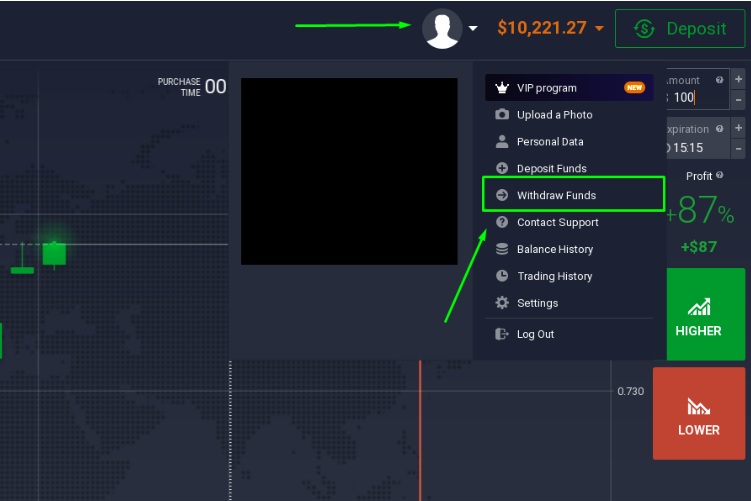
- Choose your withdrawal method (e.g., card, Skrill).
- Enter the amount you wish to withdraw.
- Submit the request and wait for approval (usually within 1 business day).
Read this guide on IQ Option withdrawals to learn more about how to cash out from IQ Option.
Withdrawal Processing Times
- E-wallets: Same day, often within hours
- Bank cards: 3–10 business days
- Bank transfers: 3–5 business days, but can extend to 10+ depending on location
IQ Option itself processes most withdrawals within 3 business days maximum, but your bank or e-wallet provider may cause delays.
Minimum and Maximum Withdrawal Limits
- Minimum withdrawal: $2.
- Maximum withdrawal: No platform-imposed upper limit, but method-specific caps may apply (e.g., Skrill account limits)
IQ Option Withdrawal Fees
IQ Option does not charge withdrawal fees for 1 withdrawal per month. After that, IQ Option charges a 2% commission on each consecutive withdrawal (yet no more than $30).
However, other fees may apply:
- Bank wire transfer: May cost $31 or more (bank dependent)
- E-wallets: May charge a commission depending on the provider
- Currency conversion: Charges may apply if your withdrawal currency differs from your account currency
Common Withdrawal Problems and How to Solve Them
1. Withdrawal Rejected or Cancelled
- Solution: Ensure your account is fully verified. Double-check your payment method and uploaded documents.
2. Delay Beyond 3-5 Days
Withdrawals to bank cards may take up to 21 days to reach your account — even though IQ Option sends the funds instantly, your bank may delay the transfer.
Solution:
- Request a bank statement (with logo, stamp/signature) covering the period from your deposit date to today. It must show the first 6 and last 4 digits of your card.
- Send it to docs@iqoption.com or via live chat, using the email linked to your IQ Option account.
- If possible, include the email of your bank contact.
We’ll forward it to the payment provider and help resolve the issue. In rare cases, the investigation can take up to 180 business days.
3. Cannot Withdraw to Card Beyond Deposit Amount
- Solution: Use an e-wallet or bank transfer for remaining funds.
4. Withdrawal Status Says “Successful” but No Funds
- Solution: It might take a few extra days for banks to reflect the amount. If longer, contact support.
Tips to Ensure Smooth Withdrawals from IQ Option
- Verify Your Account Early: Do this right after your first deposit to avoid delays later.
- Use E-Wallets if Possible: They’re faster and allow for larger, instant withdrawals.
- Stick to One Method: Consistency helps prevent security red flags.
- Avoid Frequent Withdrawals: Try to group small withdrawals into one to avoid unnecessary fees.
- Use Real Names Only: Your account and payment methods must be in your legal name.
How to Withdraw Profits Earned from Bonus Funds?
IQ Option offers various bonus promo codes, such as deposit and no-deposit offers. If you’ve used bonus funds to trade, keep in mind that special conditions apply when withdrawing any resulting profits:
- Most bonuses come with a turnover requirement, typically around 30 times the bonus amount, before you’re eligible to withdraw profits.
- Attempting to withdraw before meeting this requirement will result in the request being declined.
- To avoid surprises, always review the bonus terms and conditions before accepting any promotional offer.
Can I withdraw money without verification?
No matter how much profit you’ve made on IQ Option, you won’t be able to withdraw it until your account is fully verified. This isn’t just a formality — it’s a strict legal requirement designed to comply with anti-money laundering (AML) and Know Your Customer (KYC) regulations.
If your account is not verified, you will be prompted to submit documents like:
- Proof of ID (passport, driver’s license)
- Proof of address (utility bill, bank statement)
- Payment method proof (photo of your card, screenshot of your e-wallet)
👉 For a full walkthrough, check out this guide on IQ Option verification.
Important: Make sure the IQ Option account is opened under your real name — not your parent’s, friend’s, or spouse’s. All documents must match the name and details registered in your account. If they don’t, you could face major issues when trying to withdraw funds later. IQ Option strictly prohibits third-party use.
IQ Option Withdrawal vs. Other Platforms
| Feature | IQ Option | Pocket Option | Olymp Trade |
| Minimum Withdrawal | $2 | $10 | $10 |
| E-wallets | ✔️ | ✔️ | ✔️ |
| Wire Transfers | ✔️ | ✔️ | ✔️ |
| Cards | ✔️ | ✔️ | ✔️ |
| Verification Required | Yes | Yes | Yes |
| E-Wallet Processing Time | Up to 24 hours | 1–3 business days | Up to 24 hours |
| Wire Transfer Processing Time | Up to 21 business days | Up to 14 business days | 2-5 business days |
| Bank Transfer Processing Time | 3–10 business days | 3–7 business days | Up to 2-5 business days |
| Bank Transfer Fees | May apply | Free in some cases | Fees vary |
IQ Option stands out for its low minimum withdrawal and rapid processing to e-wallets, making it ideal for active traders who want quick access to their capital.
Final Thoughts
Withdrawing money from IQ Option is safe and easy as long as you follow the rules. The company uses secure payment gateways, works only with reliable payment providers, and adheres to strict compliance protocols. Also, IQ Option withdrawal methods are region-specific, meaning you can get your profits via your go-to bank or e-wallet.
99% of the most common problems users face stem from misunderstanding policy details. Make sure to verify your account, stick to a consistent payment method, and understand how refund rules apply to cards to ensure a smooth withdrawal. E-wallets remain the best option in terms of speed and reliability.