


When you register at IQ Option, you can deposit and even start trading right away without verification. However, if you want to withdraw your funds or enjoy the full functionality of the platform, you must verify your IQ Option account. Many traders don’t realize this until they try to withdraw for the first time and face restrictions. That’s why it’s better to complete verification as soon as possible.
In this guide, we’ll explain step by step how to verify IQ Option account, what documents you need, and how long does it take to verify IQ Option account.
Why Do You Need to Verify IQ Option Account?
Before you can trade freely or withdraw money, IQ Option must confirm your identity. This process is required by financial regulations to:
- Prevent fraud and money laundering
- Protect your account from hackers
- Make sure the money belongs to the real owner
If you skip verification, your account will be restricted. You may deposit, but you cannot withdraw. That’s why it’s important to verify your account as soon as you register.
What Documents Are Needed to Verify IQ Option Account?
To verify IQ Option account, you need to provide three types of documents:
- Proof of Identity
You can attach one of the following ID types:
- Passport
- National ID card
- Driver’s license
👉 Make sure the document is valid (not expired), shows your full name, date of birth, and a clear photo.
- Proof of Address
You can provide a proof of your address via:
- Bank statement
- Utility bill (electricity, gas, water, internet)
- Official government letter
👉 The document must show your full name and address, and it must be dated within the last 3 months. Screenshots or handwritten bills are not accepted.
- Payment Method Verification
- If you deposit with a bank card: photo of the card (only first 6 and last 4 digits visible, middle digits covered).
- If you use an e-wallet (Skrill, Neteller, etc.): screenshot of your wallet profile showing your name.
- If you deposit with a bank card: photo of the card (only first 6 and last 4 digits visible, middle digits covered).
Step-by-Step: How to Verify IQ Option Account
Here’s a simple step-by-step process:
Step 1. Log in to Your IQ Option Account
- Open the app or website.
- Go to the profile section.
- You will see a notification asking you to complete verification.
Step 2. Verify your email
First, confirm your email address. Open your inbox, find the verification email from IQ Option, and enter the code into the corresponding box.
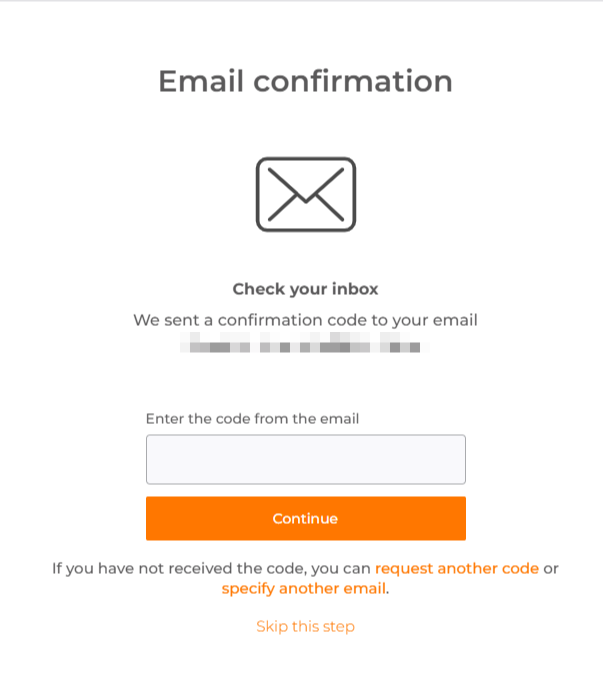
👉 Make sure you’re using your own active email address, because this is where IQ Option will send important updates, security alerts, and account information.
Step 3. Fill in Personal Information
- Enter your full name, date of birth, and address.
- Make sure it matches the information on your documents.
👉 Do not register an account using third-party information (friends, relatives, etc.). It’s crucial that you provide your own personal details.
Step 4. Upload Proof of Identity
The next step requires you to upload a photo of your document. To do this, you’ll need to allow the platform access to your camera.
- Take a clear photo of your passport, ID card, or driver’s license.
- The entire document must be visible, no corners cut off, no blur.
- The uploaded file should be provided in JPG or PDF format and can’t exceed 8 MB.
👉 Use this manual to upload your ID correctly.
Step 5. Upload Proof of Address
To confirm where you live, IQ Option asks for a document that shows your current address.
- Take a photo or scan of your bill or bank statement.
- Ensure your name, address, and issue date are clearly visible.
Step 6. Verify Payment Method
The platform also needs to check the method you used to deposit money into your account.
- If you used a bank card, upload the photo with covered digits.
- If you use an e-wallet, upload the screenshot of your account page.
Step 7. Wait for Confirmation
Once all your documents are uploaded, the final step is to wait for IQ Option’s team to review and approve them.
How Long Does It Take to Verify IQ Option Account?
Usually, it takes up to 3 business days for IQ Option to verify your account.
If your documents are clear and correct, it may be approved in a few hours. If your photos are blurry, expired, or don’t match your profile info, the process will be delayed.
👉 Upload high-quality scans or photos to avoid rejection.
Common Problems During Verification
Sometimes traders face issues when trying to verify IQ Option account. Here are the most common mistakes:
- Blurry or low-quality photos – documents must be sharp and readable.
- Expired ID or utility bill older than 3 months – always use recent and valid papers.
- Different names – if your profile name and document name don’t match, verification will fail.
- Wrong file type – use JPG or PNG, not unusual formats.
- Partial documents – don’t cut off corners or hide important details.
If your account gets blocked because of incorrect documents, you’ll need to re-upload the correct ones. In rare cases, IQ Option may temporarily block accounts that look suspicious. This is a security measure, not a punishment.
👉 Read more about common mistakes and issues on the Verification page of the IQ Option website
IQ Option: Verify Account Faster With These Tips
Here are a few simple tricks that will help you finish the verification process quickly and without delays:
- Prepare documents before registering.
- Use the same name and address everywhere.
- Double-check photo quality. Good lighting helps.
- Cover sensitive details. On bank cards, hide middle digits and CVV code.
- Don’t rush. Make sure every file is correct before uploading.
What Happens After Verification?
Once your account is verified, you can deposit and withdraw money without restrictions, and your account is more secure against fraud.
Final Thoughts
Account verification may feel like a boring step, but it’s essential. Many traders waste time asking, “How to verify IQ Option account?” or “How long does it take to verify IQ Option account?” simply because they didn’t read the instructions.
If you follow the steps above, you’ll finish the process quickly and avoid restrictions. Think of verification as your safety net: it protects both your money and your identity.
Now you know exactly how to verify IQ Option account. Do it once, and you’ll never worry about blocked withdrawals.